Takt planning is one of the most effective ways to improve predictability in a construction project.
A well-prepared takt schedule shows where each work phase should be, when it should move to the next
area and where bottlenecks may appear in production.
Many projects start takt planning in Excel. It is a good way to understand the principle, but in practical
production control, maintaining the schedule, managing changes and coordinating multiple parties often
require a tool designed specifically for that purpose.
In this article, we go through how to create a takt schedule step by step and what you should consider
before taking the schedule into daily site management.
What is a takt schedule?
A takt schedule is a production plan in which work phases move from one area to another at an agreed pace.
Its purpose is not only to show dates, but to create a smooth and manageable production flow for the
construction project.
A traditional schedule often tells when a task should start and finish. A takt schedule also shows where
the work takes place, in what sequence different crews move and how the work should flow from one area
to the next without unnecessary waiting.
A good takt schedule is not just a colorful table. It is a shared production plan used to manage the flow of work on site.
Step 1: Define the objective and scope
Before building the schedule, you need to decide what takt planning will be used for. Will the takt
schedule cover the entire project, a single construction phase or a specific recurring production section?
Takt planning works best when the work includes repetition. Typical use cases include the interior
finishing phase of an apartment building, hotel rooms, hospital patient rooms, pipe renovation projects,
facade work or other production flows that progress area by area.
Practical tip
Start with a limited scope. If your organization is using takt planning for the first time, it is usually
not worth building the first takt schedule for every work phase of the entire project.
Step 2: Divide the site into takt areas
A takt area is a location where one crew completes an agreed work package during one takt period.
A takt area can be an apartment, a floor, a section, a room, a corridor area or another clearly defined
production area.
A good takt area should be small enough to allow accurate planning, but large enough for a crew to complete
a meaningful amount of work during one takt time.
If takt areas are too large, the flow slows down and disruptions become hidden. If they are too small,
the schedule becomes difficult to manage and crews may spend too much time moving between areas.
Step 3: Identify work phases and create work packages
Next, list the work phases that move from one takt area to another. In the interior finishing phase,
these may include partition walls, building services installations, plastering, painting, suspended ceilings,
fixtures, flooring and final cleaning.
These work phases are then grouped into work packages. A work package is a clear entity for which
responsibility, prerequisites and completion criteria can be defined.
A work package should be clear enough that all parties understand what is included in the task and when
it can be considered complete.
Step 4: Determine task durations and resources
A takt schedule should not be built on guesses. Each work package needs a realistic duration estimate and
a clear understanding of the required resources. This requires collaboration between site management,
subcontractors and, when necessary, designers.
The questions are simple, but important:
- How long does the work package take in one takt area?
- How many workers are needed for the task?
- What preceding work must be completed?
- What materials, drawings or decisions are needed before the task can start?
- Can the crew move smoothly to the next area?
This step often reveals the first bottlenecks. If one work phase takes clearly longer than the others,
it can easily determine the pace of the entire production flow.
Step 5: Choose the takt time
Takt time means the rhythm at which crews move to the next area. It can be one day, two days, one week
or another interval that suits the project.
Choosing the takt time is one of the most important decisions in takt planning. A takt time that is too
short can make production unstable and increase sensitivity to disruptions. A takt time that is too long
can reduce the benefits of takt production and increase the overall lead time.
Takt time should not be theoretically as short as possible. It should be practically achievable in production.
Step 6: Build the first takt schedule
Once the takt areas, work packages and takt time have been defined, the first takt schedule can be built.
In its simplest form, it is a matrix where one axis represents time and the other represents takt areas.
Work phases are placed into the schedule so that they move from one area to another in a consistent rhythm.
At this stage, the schedule does not need to be perfect. The most important goal is to make the production
flow visible and identify the points where work phases collide, waiting occurs or resources are insufficient.
The first version is a basis for discussion. It helps the project team evaluate whether the plan is realistic
and how it should be adjusted before implementation.
Step 7: Check dependencies and prerequisites
A takt schedule can easily fail if tasks are simply placed on a calendar without checking whether they
are truly ready to start. Each work package must have clearly identified prerequisites.
These may include approved drawings, material availability, release of the work area, completion of previous
work, inspections, permits, lifting operations, access routes and workforce availability.
If prerequisites are not managed, the takt schedule may look good on paper but break down on site as soon
as the first constraints appear.
Remember constraint management
Takt scheduling and Last Planner support each other well. Takt planning shows the production flow,
and Last Planner helps ensure that tasks in the coming weeks are genuinely ready for execution.
Step 8: Involve subcontractors
A takt schedule should not remain a one-sided plan created by the main contractor. The people and companies
performing the work need to participate in planning because they understand the real durations, resources,
risks and execution methods.
When subcontractors participate in takt planning, the schedule becomes more realistic and commitment
improves. At the same time, the parties can agree more clearly on what each of them needs from others in
order to succeed in their own work.
Step 9: Simulate disruptions and bottlenecks
Before implementation, the schedule should be tested. What happens if one work package is delayed by a day?
What if a material delivery is late? Where does the entire production flow stop first?
Identifying bottlenecks before production begins is one of the greatest benefits of takt planning.
When risks are visible in the schedule, they can be addressed before they cause delays.
Step 10: Bring the takt schedule into daily management
A takt schedule creates value only if it is actively used in production management. It must be part of
weekly and daily site management, not just a planning-phase document.
In practice, this means that the site team regularly monitors:
- whether work phases are in the right takt area at the right time
- which tasks are delayed or at risk of delay
- which constraints must be removed before the next takt
- how changes affect the entire production flow
- what can be learned for the following areas
Free example: a simple takt schedule
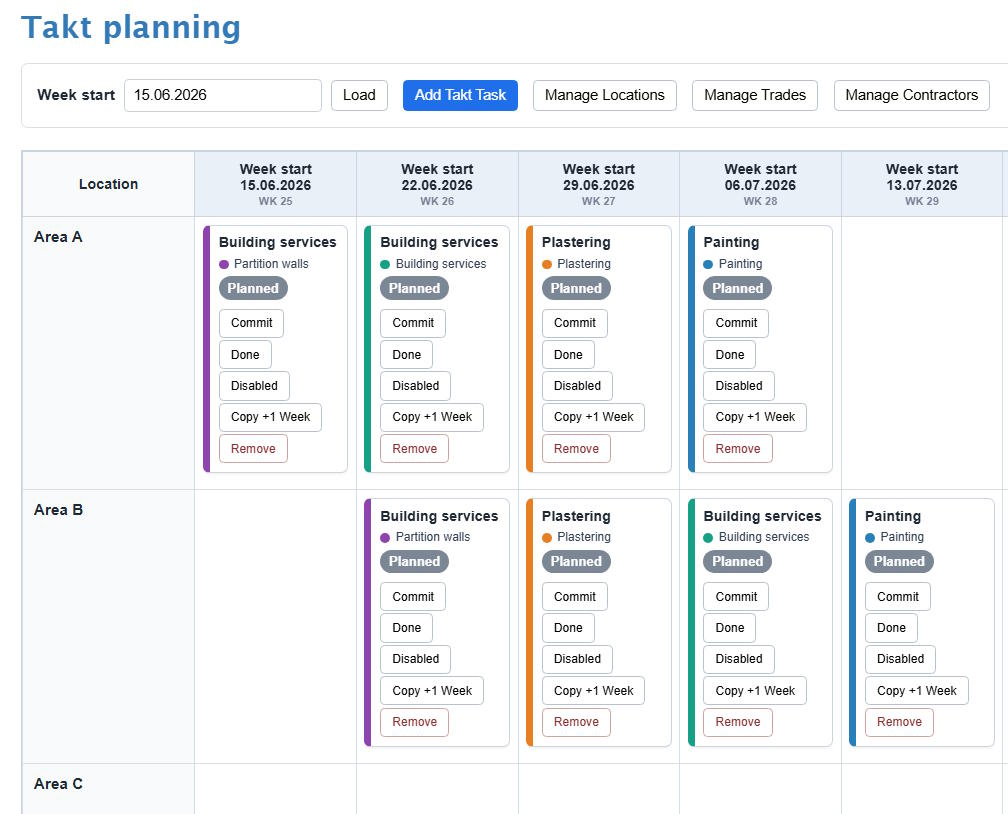
The simplified example below shows how four work phases can move through four takt areas with a one-week
takt time.
Example structure
Takt areas: A, B, C and D
Takt time: 1 week
Work phases: Partition walls, building services, plastering and painting
Principle: Each work phase moves to the next area every week.
For example, in the first week, partition wall work starts in area A. In the second week, partition walls
move to area B and building services work starts in area A. In the third week, partition walls move to
area C, building services move to area B and plastering starts in area A. In this way, work begins to flow
from one area to the next in the agreed rhythm.
In a real project, more detailed work packages, resources, prerequisites, inspections, buffers and possible
disruption allowances are added. However, the basic logic remains the same: work progresses by area at an
agreed pace.
The most common mistakes when creating a takt schedule
The same mistakes often appear in takt planning. Avoiding them significantly improves the usability of
the schedule.
- Takt areas are too large or very different from each other.
- The takt time is chosen too optimistically.
- Work packages are unclear or too broad.
- Subcontractors are not involved in planning.
- Prerequisites are not checked before tasks are scheduled.
- The schedule is not updated when changes occur.
- The takt schedule is disconnected from weekly planning and daily management.
Excel or takt planning software?
Excel may be enough for sketching the first takt schedule. However, as the project grows, changes occur
continuously and the number of parties increases, maintaining the schedule in Excel can quickly become
heavy.
Modern takt planning software helps build, edit and monitor the schedule in one place. When takt time,
work packages or area division changes, the effects on the entire production flow can be seen quickly.
This is especially important when takt planning is to be combined with Last Planner weekly planning,
constraint management and production progress data.
Summary
Creating a takt schedule begins with the objective and with dividing the construction site into clear
takt areas. After that, work phases are identified, work packages are formed, takt time is selected and
the production flow is made visible.
A good takt schedule is created through collaboration. It is not merely a document produced by a scheduler,
but a shared plan that site management, subcontractors and other parties can use to manage production
proactively.
When the takt schedule is connected to weekly planning, constraint management and progress tracking,
it becomes a powerful tool for construction production control.
Would you like to create takt schedules more easily?
L-Planner helps you create a takt schedule, connect it with Last Planner weekly planning and monitor
production progress in one system. You can quickly see where work phases are progressing, which tasks
are ready to start and where constraints are emerging in production.
Book a demo